
VRTube1.0 - Google Play
You'll be able to see results in few seconds.
Publisher Description
Version 1.0 is now in public beta! Please use the following link to opt-in if interested https://play.google.com/apps/testing/com.ideamats.vrtubefull
With VRTube you can enjoy 3D and 2D videos (both online and local) in a virtual reality world. It utilises Google Cardboard SDK to provide you the easiest VR experience and features a touch-free UI optimised for viewing when wearing the Cardboard goggle.
Key features of VRTube include
* Able to open Youtube links so you don't need to type in the video id
* Allow changing video mode (3D / 2D, swap left / right, letterbox / fullscreen)
* Able to open local video files and LAN file sharing videos (with ES File Explorer)
* Organise playlists
* Read playlists from your Youtube account.
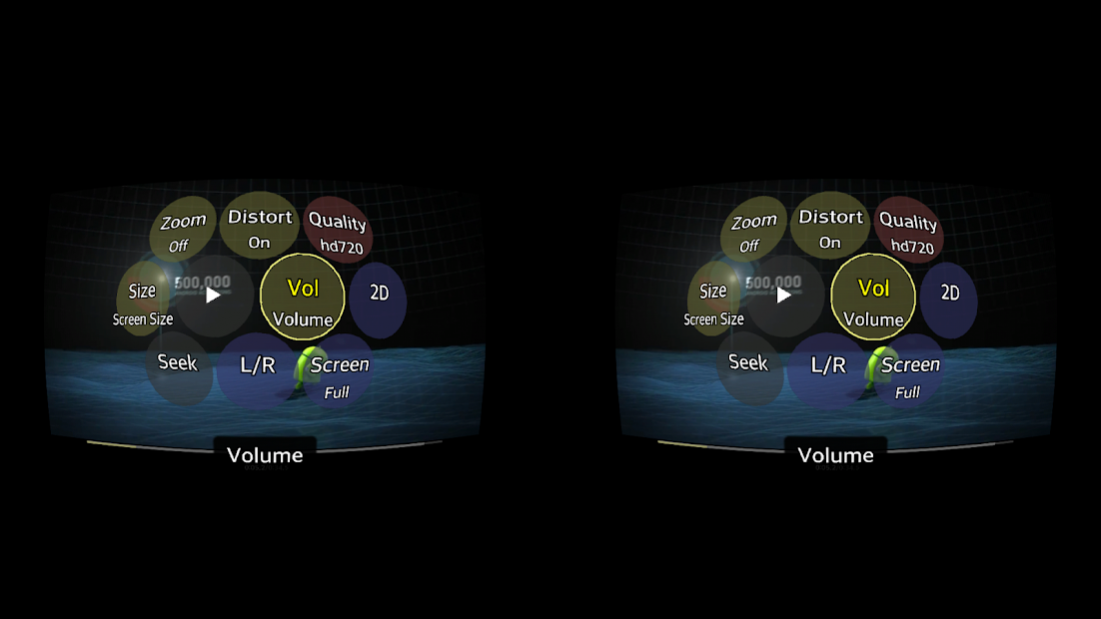
* Interactive UI for changing settings while watching video
Quick guide
* Browse and play local videos
With your favourite browser, either system Gallery app or any file explorer app, select a video, choose using VRTube to open, then you can choose either to add video to a playlist or play it right away.
* Browse and play Youtube videos
Use the search app, type in your keyword and add yt3d or 3D, SBS if you are looking for 3D videos. Tap on the search result and choose VRTube to play or add to a playlist.
You can also create your playlist on youtube, then open VRTube, from the playlists screen connect your Youtube account and your playlist will appear there.
* Basic operations
Cardboard magnet trigger or buttons on your headsets can be used as input device to "click" while watching videos in Google Cardboard.
+ A single click pauses video and display the menu, navigate the menu through your head tracking and click again to activate menu item. The menu allows you to change video modes, zoom level, seeking, changing volume and navigate to next / previous video in the playlist.
+ A double click centers the screen
+ Volume keys on your headsets will trigger a quick setting menu that allow you to make change to volume, seeking and zoom level. Switch these modes by "clicking" and change value by using the volume + and - keys.
About VRTube
The company that develops VRTube is Idea Matters. The latest version released by its developer is 1.0.
To install VRTube on your Android device, just click the green Continue To App button above to start the installation process. The app is listed on our website since 2017-08-16 and was downloaded 0 times. We have already checked if the download link is safe, however for your own protection we recommend that you scan the downloaded app with your antivirus. Your antivirus may detect the VRTube as malware as malware if the download link to com.ideamats.vrtubefull is broken.
How to install VRTube on your Android device:
- Click on the Continue To App button on our website. This will redirect you to Google Play.
- Once the VRTube is shown in the Google Play listing of your Android device, you can start its download and installation. Tap on the Install button located below the search bar and to the right of the app icon.
- A pop-up window with the permissions required by VRTube will be shown. Click on Accept to continue the process.
- VRTube will be downloaded onto your device, displaying a progress. Once the download completes, the installation will start and you'll get a notification after the installation is finished.
Program Details
System requirements
Download information
Pricing
Version History
version 1.0
posted on 2017-08-16
1.0 release
version 1.0beta1
posted on 2015-12-06
* Video file browser that searches files automatically on your local drive or LAN shared folders,* Redesigned UI
Disclaimer
Official Google Play Link
We do not host VRTube on our servers. We did not scan it for viruses, adware, spyware or other type of malware. This app is hosted by Google and passed their terms and conditions to be listed there. We recommend caution when installing it.
The Google Play link for VRTube is provided to you by apps112.com without any warranties, representations or guarantees of any kind, so access it at your own risk.
If you have questions regarding this particular app contact the publisher directly. For questions about the functionalities of apps112.com contact us.
